 BC Northern News
- Board Office Construction Work
- Water and Land Sustainability Issues Webinar Series
- 2027 AGM Invitation
Board Office Construction Work
The Board is open but if you plan on coming to the Board Office please be advised that we are having some construction work done on the sidewalks and parking lot. So please be careful!
May 19, 2026
____________________________________________________________________________________________________________________
Water and Land Sustainability Issues Webinar Series – Self-Directed PDP
We are happy to announce the 2026 Water and Land Sustainability webinar series. This series is presented by the BC Northern Real Estate Board and the Real Estate Foundation. These webinars are open REALTORS® and to members of the public, so feel free to share with your clients, friends and neighbours!
Webinar 3: Mining in BC
When: July 9 | 12:00-1:00
Where: Online
Cost: FREE
Presenter: Nikki Skuce, Northern Confluence Initiative
Webinar 4: Climate Changes in BC
When: August 20 | 12:00-1:00
Where: Online
Cost: FREE
Presenter: Stephen Dery, UNBC
Webinar 5: Riparian Rights in BC
When: September 10 | 12:00-1:00
Where: Online
Cost: FREE
Presenter: Sue Lynch
Webinar Description: Learn all about Riparian Rights in BC: What are Riparian Rights in BC, Practical Implications for Property Owners: Property Boundaries, Construction or alteration, Protection Measures and Environmental Stewardship and more!
Webinar 6: Heritage Conservation Act
When: October 8, 2026
Where: Online
Cost: FREE
Presenter: Victor Khong
Webinar Description:
This one-hour lunch-and-learn introduces REALTORS® to practical due diligence issues when a property may contain, or be affected by, protected heritage sites, archaeological sites or other matters regulated under British Columbia’s Heritage Conservation Act.
Healthy Watersheds: Thriving Communities
When: November 5 | 12:00-1:00
Where: Online
Cost: FREE
Presenter: Tara Marsden and Leanne Sexsmith
Webinar Description:
Fresh water is the lifeblood of communities. Rivers, streams, lakes and wetlands provide safe, clean water for drinking, growing food, sustaining communities and culture, and powering local economies. Yet climate change and human pressures on the environment are impacting the health and wellbeing of watersheds across British Columbia. In the last five years, BC has experienced historic wildfires, flooding and drought, impacting human and watershed health, economic strength, and the sustainability of fish and wildlife species. Join us for this webinar to learn about inspiring projects and partnerships that are bringing communities together with reciprocity and respect to implement watershed security solutions with co-benefits for people, the economy and nature.
For more information and to register, go to the Member Portal, Education, TLC Calendar. Members of the public can email admin@bcnreb.bc.ca to register. Each webinar in this series is eligible for one hour of Self-Directed PDP.
April 21, 2026
_____________________________________________________________________________________
Invitation to BC Northern's 2027 AGM in Prince George
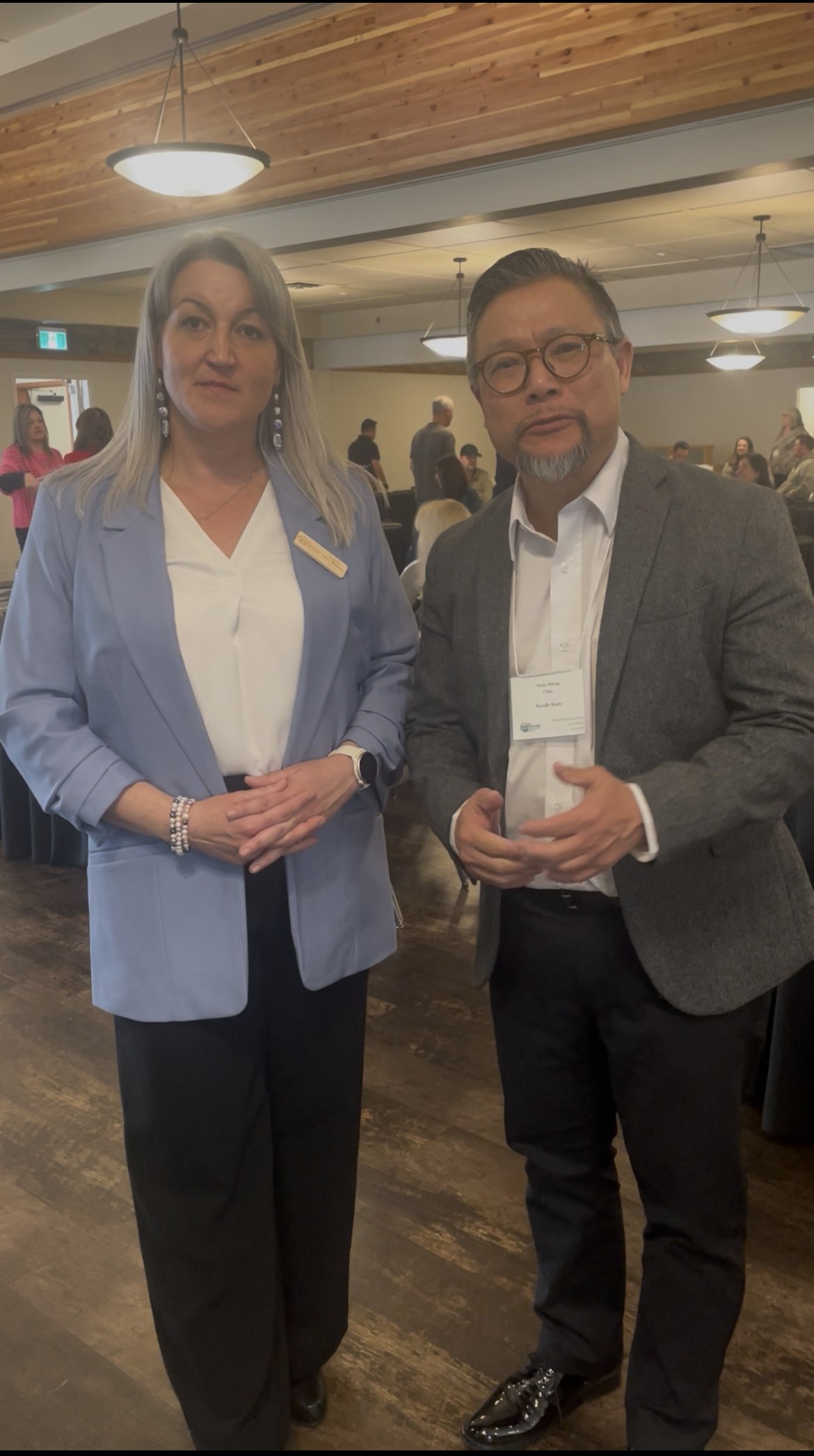
BCNREB Past Chair, Victor Khong and Current Chair, Vanita Des Mazes would like to personally invite all members to the 2027 AGM in Prince George on April 9, 2027.
Click HERE to watch the video or click on the photo below:
May 5, 2026
_______________________________________________________________________________________
Phishing Emails Targeting REALTORS® through REALTOR.ca Leads
The Canadian Real Estate Association (CREA) is aware and is investigating reports of phishing emails targeting members through REALTOR.ca. These emails may request that you click on a video conferencing link, we advise that you do not click on the link.
In many cases, the pattern looks like this:
- You receive a lead inquiry through REALTOR.ca with the standard default message.
- After replying, the sender follows up and asks to move quickly to a Google Meet, Microsoft Teams, or Zoom meeting, often saying this is to “build trust” or something similar.
- A meeting link is then sent to you.
- Clicking the link prompts you to download software or files that may be harmful to you or your business.
How you can protect yourself:
- Be cautious of follow-up messages that push for immediate meetings without a phone conversation, avoid basic questions about their buying or selling journey, or use vague or generic language.
- Avoid clicking any links sent from new leads or contacts and instead suggest scheduling meetings through your own calendar or meeting platform.
- Never download files or software sent by someone you don’t know.
- Take a moment to review links before clicking and confirm the domain looks legitimate.
- Keep your device and antivirus software up to date.
If you do receive a phishing email, please email Lori at admin@bcnreb.bc.ca.
January 5, 2026
________________________________________________________________________________________
Paragon® AI: Photo Labels Permanent Opt-out Option Now Available
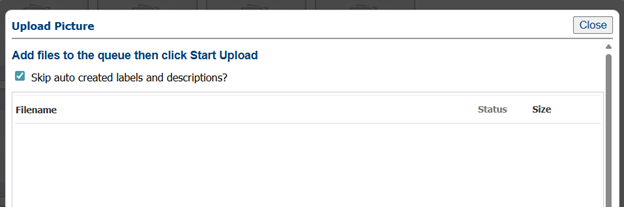
You can now opt out of automatic photo labels and remain opted out for all subsequent listings, unless you choose to opt in again.
To opt out, select "Skip auto created labels and descriptions."
September 10, 2025
______________________________________________________________________________________
SentriLock: Process on Weekends
As SentriLock accounts are restricted to one device per account, when you upgrade your phone, you are required to contact the Board Office for assistance.
In the event that you obtain a new phone on the weekend, you may reach out directly to SentriLock. They will update your account accordingly, allowing you to access the SentriKey app on your new device. Please be sure to let them know you are BC Northern member.
SentriLock Support: 1-877-822-4424
If you have any questions or concerns, please contact the Board Office.
September 5, 2025
_______________________________________________________________________________________
Paragon Sold Statuses
The Sold Statuses added to Paragon®
The Statues:
- Active Under Contract (U)- This optional status will be used when a listing has an accepted offer with subjects on it.
- Pending (P) - Replacing the current “Sold” status, this status will be applied to listings that have been reported.
- Closed (F)- Listings will automatically move to this status at the end of their completion date.
On Paragon these statuses are displayed as:
- Active Under Contract - U
- Pending - P
- Closed - F
Click HERE for the steps edit your Saved Property Searches
For more information go to the Board Resources Page: Business Centre – BC Northern Real Estate Board (bcnreb.bc.ca)
July 24, 2024
_______________________________________________________________________________________
SentriLock: Non-Bluetooth Lockboxes Reminder
Since March 1st, 2024 the SentriCard is no longer supported, which also means support for all non-Bluetooth boxes will be limited. Non-Bluetooth lockboxes can be used with limited functionality, however, SentriLock will not replace, repair, or conduct in-depth troubleshooting. Please do not purchase used non-Bluetooth boxes without first knowing the limitations.
Support for all non-BLE boxes will be limited. Using the app, members can open lockboxes, release shackles, assign lockboxes to listings, generate one day codes, and more. Non-BLE lockboxes can be used, however, SentriLock will not replace, repair, or conduct in-depth troubleshooting.
As the non-BLE lockboxes can still be used (with limited functions) if you do plan to continue using them, we recommend ensuring the batteries have been changed prior to January. Batteries can be ordered from the board office.
Because all SentriCard functions will no longer be supported, the following functions will NOT be possible, by any users:
- Opening Lockboxes with a SentriCard,
- Releasing Shackles with a SentriCard,
- Assigning a lockbox to a listing with a SentriCard,
- Renewing a SentriCard,
- Transferring Ownership of non-Bluetooth lockbox
- Any additional features completed with a SentriCard (for example: troubleshooting, setting a lockbox clock on a non-Bluetooth lockbox, etc.)
Please contact the Board Office if you have any questions or concerns.
November 4, 2023
Updated January 19, 2024
_____________________________________________________________________________________
Foreign Buyers Ban CMA/CA Layer available in AUTOPROP
AUTOPROP has added a map layer showing properties within a census metropolitan area (CMA) or a census agglomeration area (CA). Recall that residential properties within a CMA/CA are covered by the Foreign Buyers Ban.
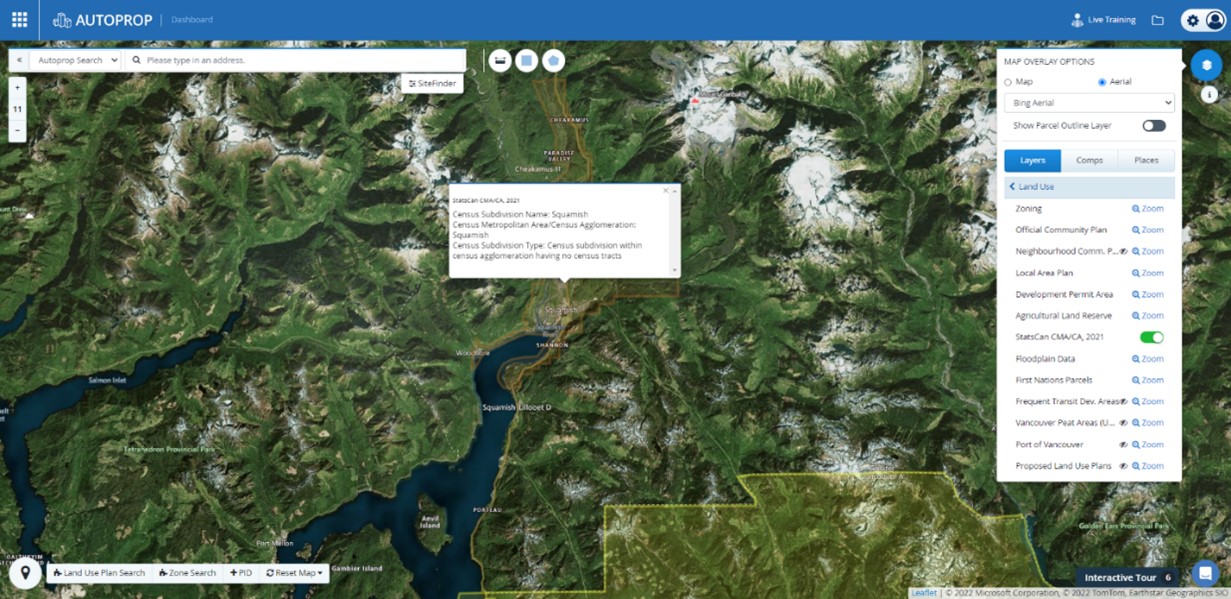
Sign into AUTOPROP through Paragon and select the Map Overlay Options (top right), Select Layers, Land Use then StatsCan CMA/CA, 2021. ( Ie Layers > Land Use >StatsCan CMA/CA, 2021). This will activate the CMA/CA layer.
If a property is within a CMA/CA you will get results. If it is not within a CMA/CA, there will be no results. See the illustrations below for a CMA/CA or not CMA/CA results.
You can search for areas or individual properties. Always begin the search with the CMA/CA layer active.
- Search a specific property by putting the address in the search box.
- Search for smaller areas using the selection tool.
- Search the very large areas and pull up the CMA/CA map dimensions by clicking on the map. (Note, unlike the two search methods above, this search method shows no results with a non-CMA/CA property. To pull up the CMA/CA dimensions you have to click within the CMA/CA)
The following picture from AUTOPROP shows a result within a CMA/CA and illustrates the layers that need to be active for the search.
Click HERE for the Practice Alert from January 11, 2023 with more information.
January 13, 2023
_______________________________________________________________________________________
SentriKey Help & Training
Sentrilock has provided some links to Help Resources:
Rural Users and non-Bluetooth Enabled Lockboxes
SentriLock has a feature where Mobile Access Codes (MAC’s) are stored on a user’s device for non–Bluetooth Enabled Lockboxes. This is specifically useful for lockboxes in low/no cell coverage areas.
Sentrilock added the ability for SentriKey users to generate MAC's for all Non-Bluetooth Enabled Lockboxes they have access to open when in low/no data areas.
How it works when there is no data connection:
When you have no connection at all, clicking view nearby properties to get a MAC does not populate the list of listings to select from since there is no connection to the server and SentriLock does not know the geo location to determine which boxes/listings are nearby. Due to this, you will be prompted to provide the lockbox serial number. When the lockbox serial number is entered, a mobile access code will be presented for you to use if the box is a Non-Bluetooth Enabled Lockbox, and you are permitted to open it.
1. From SentriKey Home Screen> Select View Nearby Properties
2. Pop-up message indicating that this feature is not available when offline. If you use Bluetooth, go to the home screen then press ENT on the lockbox. OR you can Select Get Code or Close
3. Select Get Code
4. Enter the Lockbox Serial Number
5. Select Get Code
6. Use Biometrics or PIN
7. Your Access Code will display
March 16, 2022
__________________________________________________________________________________________________________________________
The Direction Regarding Presentation of Offers form is Available on WEBForms®
With the hot market, the Board has been receiving numerous complaints or requests for clarity on the MLS® Rule 5.05 Offers. The Board of Directors has approved an amendment to MLS® Rule 5.05 to take effect immediately. The changes include:
- A new Direction Regarding Presentation of Offers form signed by the seller is to be used where the rule requires the sellers’ instructions to be in writing. The signed form is to be provided to the Cooperating Brokerage upon request or may be added to the Listing’s associated documents.
- A clearer procedure for delaying offers under 5.05(c)(i-iv) have been added. The procedure also sets out how to handle instances where the seller changes their instructions and decides to accept offers early.
A few practice points:
- The Direction Regarding Presentation of Offers form is not written in stone. If your client wants to change their instructions, they need only sign and date a new form setting out the new instructions. You would then provide the signed form to any interested buyer’s agent.
- Should your seller client decide to take an offer prior to a previously specified time (ie. prior to the date set out in the “No offers until (a specified date or time)” notice), you will usually want to council your client to, where possible, set a new date/time to accept offers, thus allowing you to notify interested buyer agents and to potentially receive their clients’ offers. It is usually in the seller’s best interest to receive multiple offers. Even a short notice period may provide the time needed for another buyer to put in an offer.
___________________________________________________________________________________
Rental Listing Option Available on Paragon
The option to enter Rental Listings into Paragon is available for BC Northern members. Only licensed members of the board may place a Rental Listing on Paragon. This a self-service option, all Rental Listings are to be added and maintained by the member. The required forms are available on WEBForms®.
Rental Listing Information:
- There is a $10 fee to add a Rental Listing,
- Rental Listings must have a Cooperating Brokerage commission and cannot be left blank,
- Rental Listings will be sent to REALTOR.ca,
- Rental Listings will not be displayed on VOW’s,
- MLS® Award points will not be awarded for Rental Listings,
- Open Houses can be added to Rental Listings,
- Managing Broker approval is required to add Rental Listings.
Click HERE for the Rentals on the MLS® Policy.
Click HERE for the instructions for how to load, amend and mark as rented.
Click HERE for the Rental Listings FAQ.
The following forms that are required for Rental Listings can be found on WEBForms®
- BCREA: Authority to Lease - Residential
- BCREA: Amendment of Authority to Lease
- BCNREB: Rental Data Input Form
If you have any questions, please contact Lori at the Board Office.
March 16, 2022, Updated November 27, 2025
_______________________________________________________________________________________________________________________
The following change became effective on January 1, 2021:
Change to MLS® Rule 4.14 Extensions:
Extensions to listings must be on the appropriate form, signed by the seller(s) and submitted to the Board prior to midnight on the expiry date, otherwise the listing will have to be relisted.
The old Rule read: Extensions to listings must be signed on or before the expiry date and submitted to the MLS® within 24 hours of receipt by the Listing Brokerage.
_______________________________________________________________________________________
If you need help with Paragon® call the Helpdesk at 1-877-222-3557 or the Board Office at 250-563-1236 or 1-800-663-8299. (If you click on the help button within Paragon it will take you to a page with a help number but they do not provide help for our members)
CREA WEBForms® Helpdesk
CREA Member Support Team can be reached at at support@crea.ca or 1-888-237-7945.
_____________________________________________________________________________________
ShowingTime
ShowingTime is the showing management tool and is integrated into Paragon®.
- Click HERE for a recorded training webinar.
- Help & Training site: https://showingtimemls.uservoice.com/
- To set up your ShowingTime profile go to Paragon®, Preferences, ShowingTime Setup
If you have any questions please call RaeAnne or Lori at the Board Office or ShowingTime Support:
Hours: Monday–Friday, 6am–7pm PST, Saturday–Sunday, 6am–3pm PST
Prospects Mobile: Brand & Share
What Is Brand & Share?
Brand & Share gives you the ability to create, brand and share your very own real estate application with both existing and potential clients. You can upload your logo, match your colors to your brand and share an installation link that will allow your clients to download and install their app to their mobile devices. Click HERE for the Brand & Share user guide.
_____________________________________________________________________________________
Did you know there is a TechHelpline available to BC Northern Members?
A member benefit of BC Northern is the TechHelpline. No matter how serious the issue you can contact the TechHelpline for tech support. The TechHepline will give you support for hardware, software, networking and mobile devices. They cannot help with Paragon®.
Hours:
Monday – Friday 6:00 am – 5:00 pm (PST)
Saturday 6:00 am to 2:00 pm (PST)
TechHelpline number: 1-877-573-8103
_______________________________________________________________________________________
Sauder Online Course Information
Do you need some PDP Credits in a hurry? A selection of online courses are available on the Sauder School of Business website. You can now find all online courses in one convenient spot. To access the website and the available courses click HERE.
Quick Links to Sauder School of Business Online Courses can be found on the Education & Skills Centre tab on the Board Resources Page.
Please be sure to inform us when you have completed an online course and we will add the credits to your education account, you can send completion certificates to education@bcnreb.bc.ca.
Please call RaeAnne or Lori at the Board Office if you have any questions.
_______________________________________________________________________________________
MLS® Matters
4.07 Contact Information in Remarks
Contact information including but not limited to names, phone numbers, email addresses and web addresses may not appear in the Public or Internet Remarks of a listing. The REALTOR® Remarks may include the name, address, telephone and/or facsimile number and/or email address of the Listing Brokerage and Members or other individuals, including the seller where the seller has directed the Listing Brokerage in writing to do so, to be contacted for more information concerning the property.
The Listing Brokerage or Member may include a direction in the Public or Internet Remarks of a listing to visit the Listing Brokerage’s or Member’s website to obtain additional information about the listing, but the nature of such additional information shall not be specified. The promotion of REALTOR® or properties not currently on MLS® is not otherwise permitted in free form fields.
_______________________________________________________________________________________
Useful links
BC Assessment
BC Online
BC Residential Tenancy
CMHC
Homeowner Protection Office
Google maps
Interface Express
myLTSA
REALTOR.ca
realtylink online
Sentrilock
WEBForms®
ShowingTime